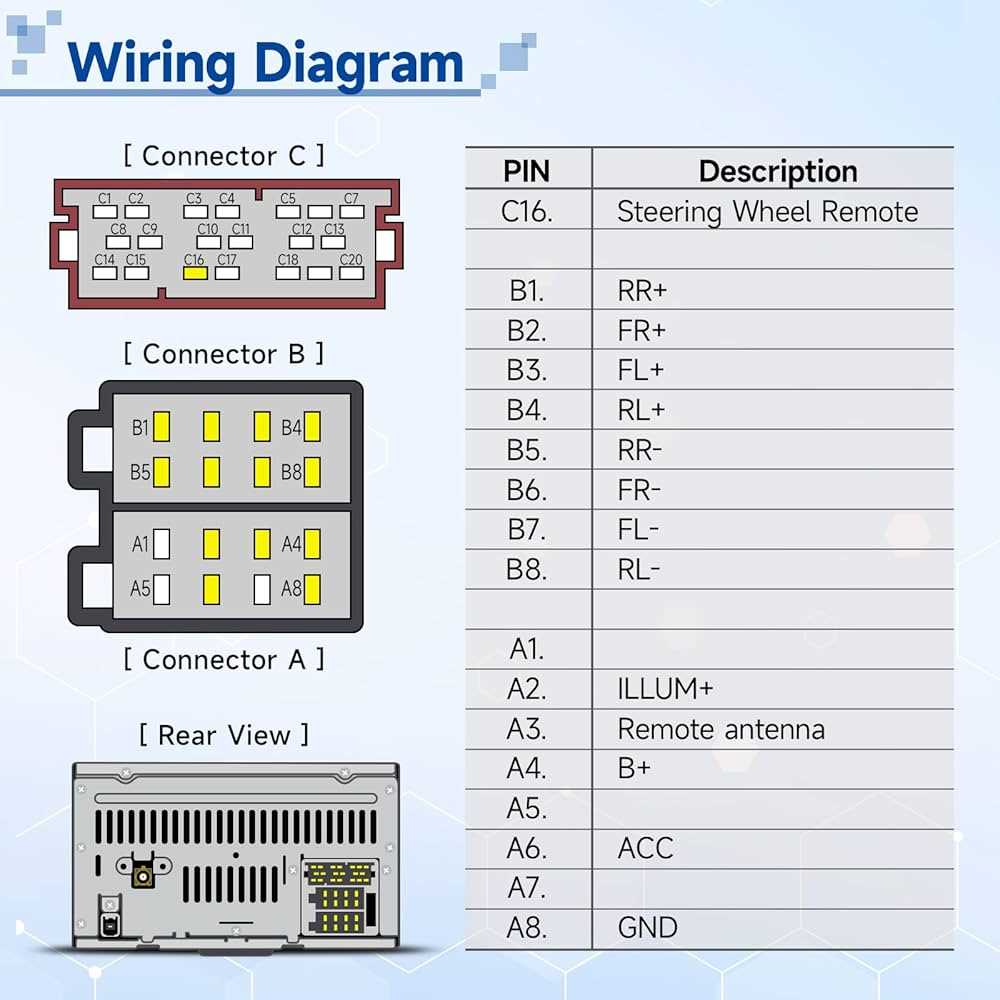
Match each wire precisely to its function before attempting any integration with the entertainment unit. The wire responsible for power supply usually carries a constant voltage and is often paired with a fuse close to the battery terminal. Confirming this connection prevents voltage drops and ensures safe operation.
Speaker conductors must be identified individually for front and rear units. Positive and negative terminals are commonly distinguished by striped or solid coverings. Incorrect attachment can result in phase reversal, which diminishes sound quality and can strain the amplifier.
Accessory-trigger lines activate when the ignition is on and should be linked to the unit’s corresponding terminal. Verifying the trigger voltage with a multimeter before connecting safeguards against short circuits and unexpected malfunctions.
Ground connections require clean, bare metal contact with the chassis. Loose or corroded grounds cause intermittent operation, static noise, or complete failure of the audio device. Securing these points with proper terminals improves signal stability.
Following these steps methodically allows for a reliable installation without relying on trial and error. Labeling each conductor and double-checking continuity before final assembly prevents damage and reduces troubleshooting time.
Electrical Connections for Vehicle Audio Systems
Match the yellow lead from the audio unit to the constant battery terminal to maintain memory functions during engine shutdown. The red lead should connect directly to the switched ignition source to power the amplifier circuits only when the car is on.
Grounding is critical: attach the black wire to a bare metal point on the chassis, avoiding painted surfaces. This reduces interference and prevents static noises in the speakers. Confirm continuity with a multimeter before final assembly.
Speaker terminals follow a standard pattern: front left pairs use white and white with a stripe, front right pairs use gray and gray with a stripe. Rear left and rear right channels are green/green with a stripe and purple/purple with a stripe respectively. Always strip insulation only enough to expose the conductor.
Auxiliary and Antenna Integration
The blue lead carries the signal to power external amplifiers or antenna boosters. Connect it to the relay or booster wire to avoid overloading the primary unit. For vehicles with amplified antennas, ensure a secure attachment to prevent intermittent reception.
Illumination control requires the orange wire with a stripe. Connect it to the dashboard lighting circuit to synchronize brightness with vehicle lights. Failure to do so may cause the display to remain dim or overly bright under varying ambient conditions.
Double-check each connection with a continuity tester before reinstalling panels. Incorrect attachment of any lead can result in blown fuses, distorted audio, or damage to electronic modules. Label each wire during removal to simplify reinstallation and minimize errors.
Identifying Kia Radio Wire Colors by Function
Check the power lead first: typically, the constant 12V feed uses a yellow insulation, while the switched ignition feed runs on red. Ground connections are almost always black, ensuring a stable return path for the system. Confirm these with a multimeter before connecting to prevent damage to the head unit or vehicle electronics.
Speaker connections follow a consistent pattern. Front left output generally has white for positive and white with black stripe for negative. Front right uses gray for positive and gray with black stripe for negative. Rear channels mirror this scheme: green with green/black for left, purple with purple/black for right. Labeling each wire individually reduces mistakes during installation.
Auxiliary and control leads often use blue, blue/white, or orange wires. Blue typically controls power antennas or amplifier triggers, while orange handles illumination dimming or dash lighting adjustments. Confirm their roles in the vehicle manual, as misidentifying these can lead to nonfunctional components or erratic behavior.
- Double-check connections with a test light before applying full power.
- Separate speaker leads from power wires to avoid interference.
- Use heat-shrink tubing for soldered joints to prevent shorts.
- Document each connection in a small diagram for future maintenance.