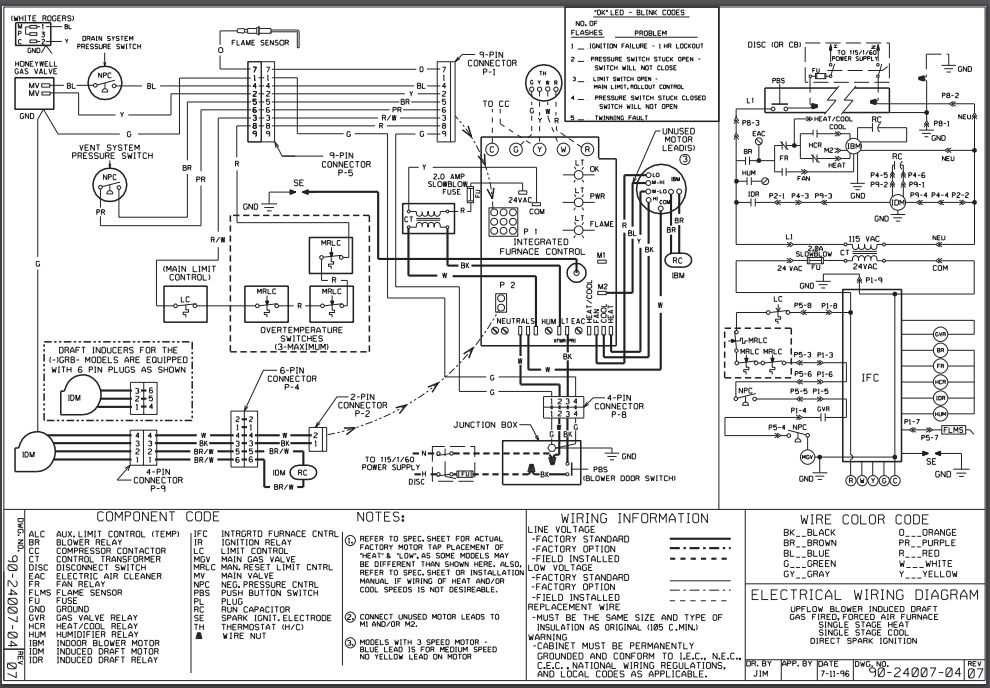
Ensure you begin by identifying the correct terminals on the unit. The most common labels for the control panel include R, W, Y, and C. The red wire typically connects to the R terminal, providing power to the unit, while the white wire goes to the W terminal for heating activation. The yellow wire should be routed to the Y terminal for cooling control. If your system has multiple stages, you’ll also need to correctly identify additional terminals for second-stage heating or cooling.
Before beginning, turn off all power at the breaker to avoid any risk of electrical shock. Then, ensure the common wire (C wire) is securely connected to its respective terminal. This wire is vital for maintaining constant power to the control unit, especially when the heating or cooling system is not actively running. If a C wire is not available in your setup, you may need to install one or use an adapter depending on the system’s requirements.
Once you have connected all the wires to their corresponding terminals, double-check that each wire is securely fastened to prevent loose connections. Loose connections can cause malfunctioning or inconsistent operation. After the connections are confirmed, restore power and test the system by switching between heating and cooling modes to ensure everything is working correctly.
Understanding the Connections for Your Heating and Cooling System
Begin by identifying the key terminals for proper connections. The most common terminals you’ll encounter are R (power), W (heating), Y (cooling), and C (common). Start by connecting the red wire to the R terminal, as it provides 24V of power. Next, the white wire goes to the W terminal for heating. If cooling is part of your system, the yellow wire should be connected to the Y terminal.
If your system includes a common wire (often blue or black), it must be attached to the C terminal. The C wire is used to provide constant power to the control unit, ensuring reliable operation. If you don’t have a C wire already installed, you may need to add one to maintain continuous power to your thermostat or control panel, especially when the unit isn’t actively heating or cooling.
Once all wires are properly connected, double-check each connection to ensure they are secure. Loose connections can cause inconsistent performance or failure to operate properly. After confirming that all wiring is securely attached, power up the system and test it by switching between heating and cooling modes to verify functionality.
If you encounter issues, such as the unit not switching between modes or a failure to power up, it’s important to revisit the wiring connections. Check for any loose terminals, damaged wires, or misconnected parts. Reassessing the wiring and making sure each terminal matches the respective wire will help ensure optimal performance of the system.
Identifying and Connecting Wires for Your System
Start by locating the terminals on the control board, which are typically labeled with letters such as R, W, Y, and C. The red wire should connect to the R terminal, as this supplies power. The white wire is used for heating control and must be attached to the W terminal. If your system includes cooling, connect the yellow wire to the Y terminal.
The common wire (often blue or black) should be attached to the C terminal, which provides continuous power to the control unit. This wire is necessary for systems that need constant power, even when they are not in active use. If your setup lacks a C wire, consider installing one or using an adapter to ensure the system functions properly.
After making the connections, inspect each wire to ensure it is securely fastened to its respective terminal. Loose connections can lead to operational issues or malfunctioning. Power on the system and test each function, including heating and cooling, to confirm that all wires are properly connected and the system operates as expected.