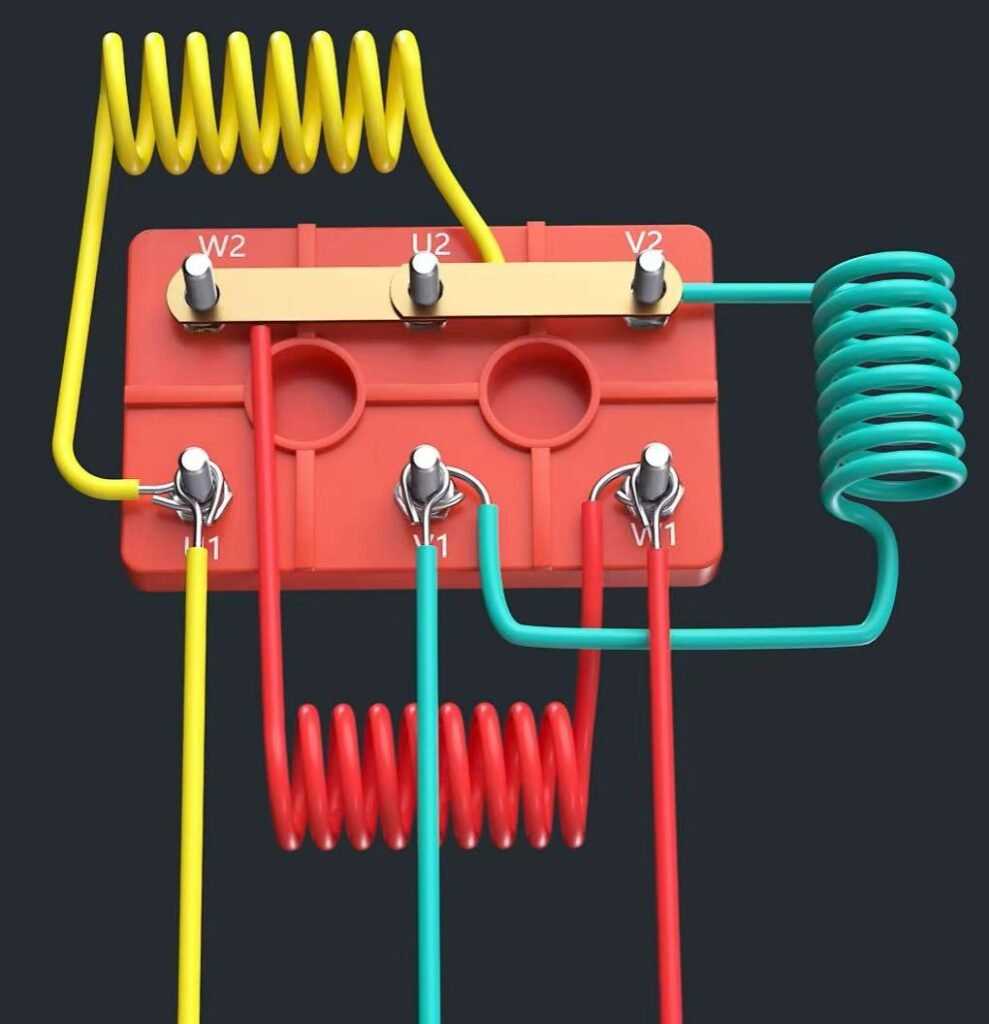
Start by identifying the main components that need to be connected: the power supply, control panel, and the machinery itself. Ensure that the voltage ratings match between the power source and the components you’re using. A mismatch can lead to system failures or damage to the equipment.
The connection process involves several key steps. First, ensure that the terminals on the equipment are correctly aligned with those of the power supply. If you’re using a multi-wire system, carefully connect the correct wires to the appropriate terminals on the control panel and motor terminals. Use a wiring schematic to guide you through the process.
When performing the connections, always follow the manufacturer’s guidelines for safety and operational standards. Pay attention to wire insulation and grounding to prevent short circuits and ensure the system operates smoothly. Testing the setup before full operation is crucial to avoid unexpected issues down the line.
If the system doesn’t respond after setup, check each connection point for secure attachment. You may also want to test for any possible interference or electrical issues within the setup. Troubleshooting small wiring problems early can save a lot of time and effort later on.
Understanding Motor Connections and Setup
Before beginning any setup, ensure that you have a clear wiring schematic. A proper layout of connections can save time and prevent mistakes. Start by confirming the power supply matches the voltage specifications required by the equipment. Make sure all components are rated for the same electrical load to avoid overloading.
Begin by connecting the power input to the control unit. This is typically where the main power cable enters. Secure all terminals tightly to avoid loose connections, which could cause sparking or short circuits. Use the correct gauge of wire based on the current load your system will carry. Refer to the manufacturer’s specifications for wire size recommendations.
Control Panel Wiring
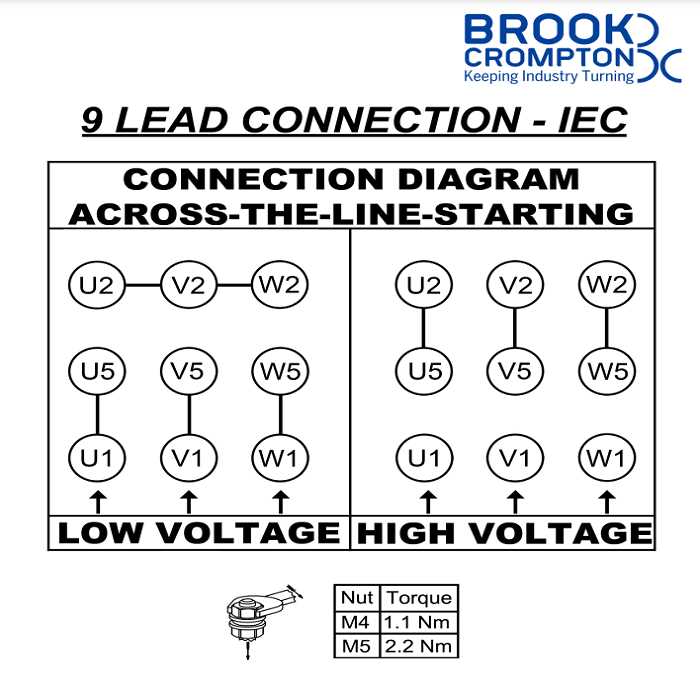
The control panel is where the electrical connections meet the operational commands. Wire each terminal in the panel to the designated areas on the power unit, ensuring the connections are labeled and color-coded for easy identification. This step is crucial for accurate functionality and safety.
Once the control panel is connected, move to the output terminals where the motor or other connected devices are located. Connect the wires leading to the motor according to the manufacturer’s recommended configuration. Be sure to follow the schematic closely to match wire colors and ensure a solid connection at each terminal.
Grounding and Safety Protocol
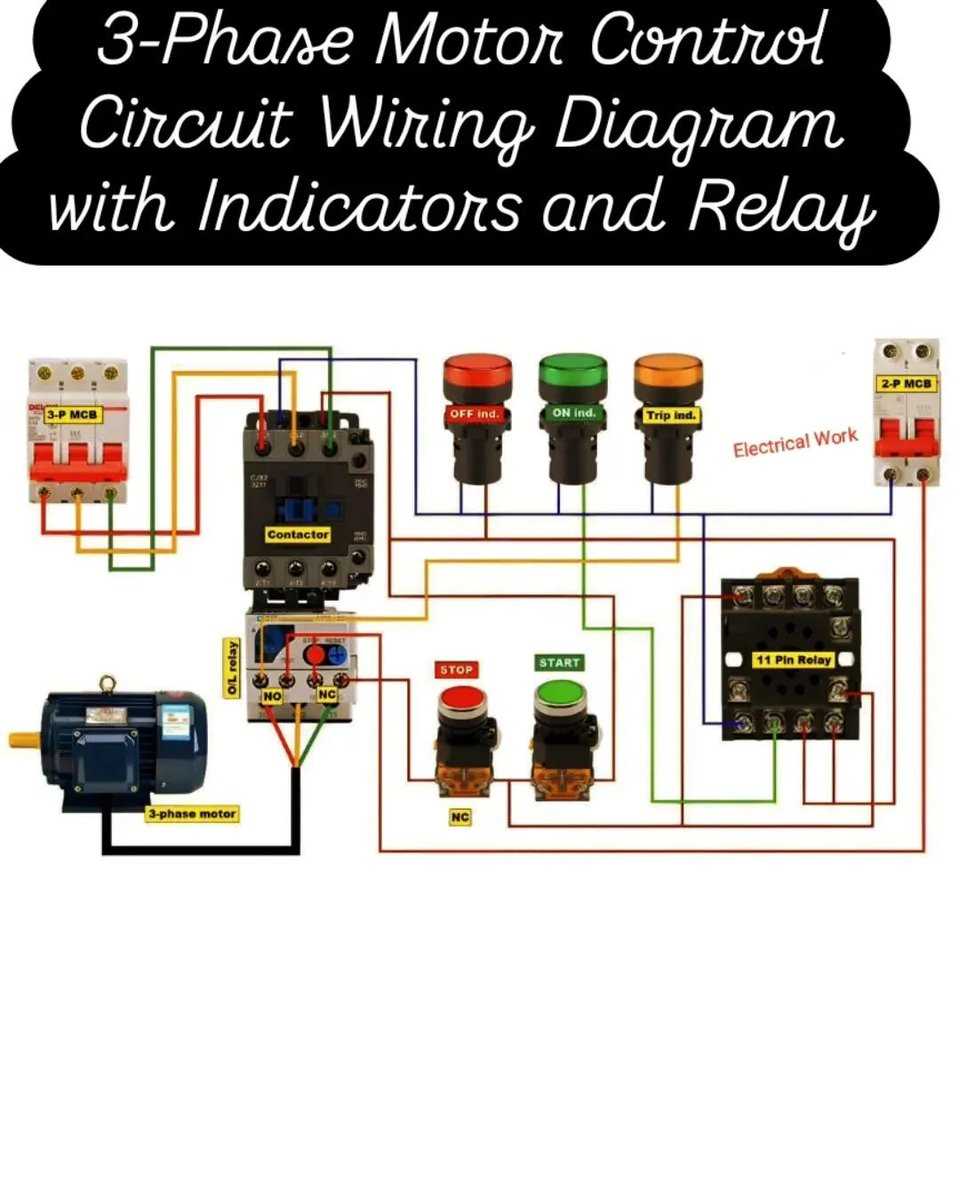
Always ground your system correctly to avoid electrical hazards. The grounding wire should be securely connected to both the power unit and the motor housing. A poor grounding connection can lead to electrical shock risks or even equipment damage in the event of a fault.
- Ensure the ground wire is thick enough to handle the load of the entire system.
- Verify the ground point is clear of paint or rust to maintain proper conductivity.
- Double-check connections to ensure no loose wires or exposed contacts are present.
After completing the wiring, verify the entire system is secure before turning on the power. Test the system in a controlled manner to ensure that the motor operates as expected and responds promptly to control inputs. Check for any unusual sounds or vibrations that might indicate an issue with the electrical setup.
If there are issues with the system not starting, retrace each connection to ensure all are in place and correctly connected. If the motor fails to run, check for signs of a blown fuse or tripped circuit breaker, which can happen if there’s an overload or short circuit.
Once you’ve confirmed the system is operational, periodically check for signs of wear on the wires or terminals. Electrical systems can degrade over time, and it’s important to stay on top of maintenance to avoid safety hazards.
How to Connect a 3 Phase Motor to a Power Supply
Begin by ensuring the power supply voltage matches the required input for the equipment. The input terminals on the control unit should be securely connected to the three-phase power source. Make sure each wire is attached to the correct terminal to avoid wiring errors that could lead to malfunction or damage to the system.
Connecting the Motor to the Power Source
Once the control unit is connected, move on to attaching the motor leads. The motor will have multiple terminals that correspond to each phase. Connect the wires from the power supply to these terminals, ensuring that each is securely tightened to prevent loose connections, which could cause issues such as power loss or short circuits.
After completing the connections, double-check that all wires are properly routed and insulated to prevent accidental contact or shorting. Once the setup is secure, test the system by powering it on briefly to check for correct operation. If there’s no response, check for any loose wires or incorrect connections.