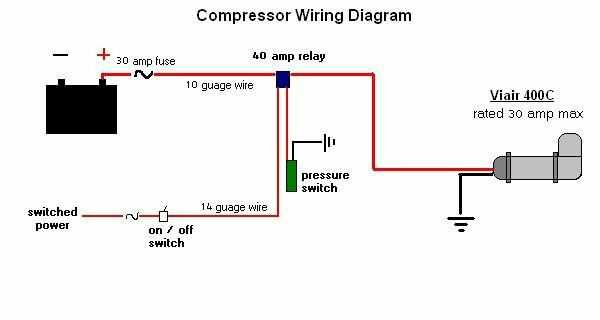
Directly connect the common and load terminals using a rated jumper to bypass normal activation while maintaining system integrity. Ensure the device is de-energized before handling to prevent accidental shorts or component damage. Use insulated tools to reduce the risk of electric shock.
Verify terminal labels before establishing any link. The ground, live, and neutral points must remain correctly identified to prevent misrouting current. Check for corrosion or loose connections that could cause intermittent operation or overheating.
After bridging, perform a low-voltage continuity test across the linked points to confirm a proper path without creating unintended loops. This step helps detect faulty contacts or incorrect placement before full system energization.
Safe Connection Practices for a 3 Terminal AC Control Device
Begin by de-energizing the system and confirming that all lines are isolated before establishing links between the live, common, and signal terminals. Use a properly rated insulated bridge to connect the designated points, ensuring no unintended paths to ground exist. Verify each connection with a continuity tester to confirm proper placement and avoid accidental shorts.
Secure all contacts with firm terminal screws and insulated caps to prevent loosening under vibration or heat. After linking, restore power and observe the device during initial operation to ensure it activates correctly without tripping other components or causing overheating. Maintain a clear layout to allow easy inspection and future adjustments.
Identifying Terminals and Correct Connection Points
Locate the common, live, and signal contacts on the device before making any connections. Each terminal is marked with standard codes, and misidentifying them can cause immediate system faults or component damage.
Use a multimeter to verify continuity and isolation between terminals. Check the common against both live and signal points to ensure there are no hidden shorts or cross-connections that could affect functionality.
Observe the physical layout of the terminals. In most three-terminal configurations:
- The center point typically acts as the common return.
- One side is connected to the power feed.
- The remaining point sends the activation signal to the control system.
Mark each connection with a colored tag or label to prevent confusion during assembly or future maintenance. This reduces the risk of swapping terminals under poor lighting or cramped conditions.
Confirm the torque on all screws and clamps to prevent loose contacts. A loose connection can create intermittent activation, leading to operational errors or electrical hazards.
During initial energizing, observe for proper response at each terminal. If the signal terminal does not activate as expected, immediately disconnect and recheck all points against manufacturer specifications.
Document the connection setup in a field note or on a reference sheet. This ensures that anyone performing inspection, maintenance, or troubleshooting can replicate the safe and correct layout without error.