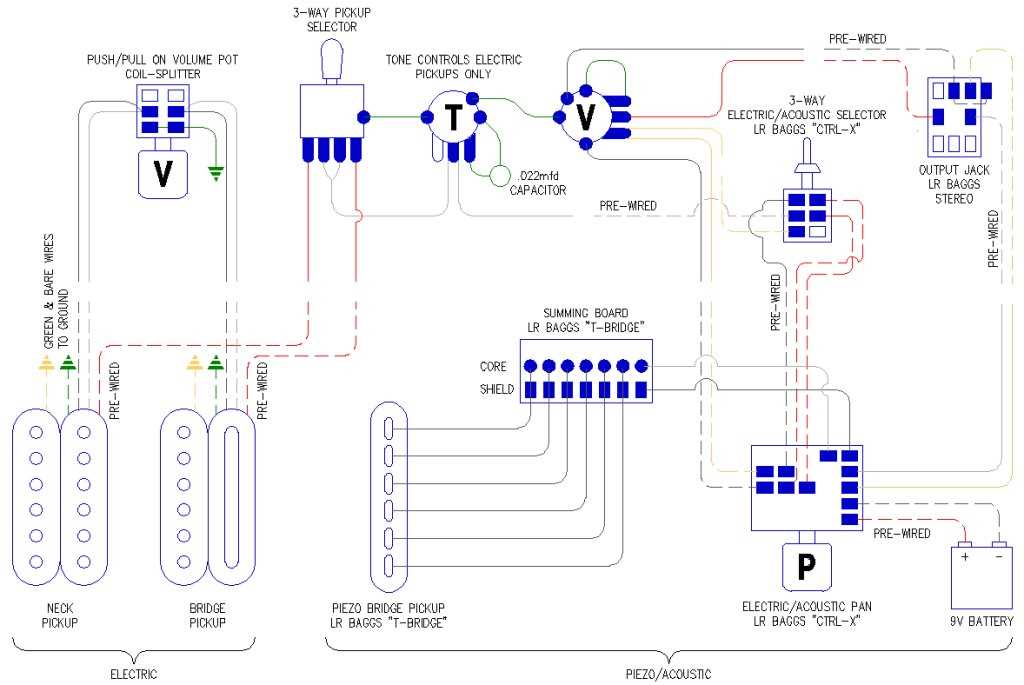
Ensure secure contacts by using high-quality plugs and terminals rated for low-resistance performance. Check solder points for clean joints without excess flux or cold spots to prevent intermittent signal loss.
Identify the tip and sleeve leads on the connector before attaching wires. Confirm continuity with a multimeter to avoid misrouting that could cause grounding issues or hum interference.
Use shielded cables for all internal connections to minimize noise pickup. Route conductors away from potentiometers and pickups to reduce coupling that may create unwanted feedback or buzz.
After assembly, perform a signal test through an amplifier or audio interface. Listen carefully for clarity and check that both channels transmit evenly without dropouts or distortion.
Connector Setup and Signal Path
Attach the hot lead to the tip terminal and the ground wire to the sleeve contact, ensuring that solder flows evenly and forms a shiny, secure bond. Trim excess wire to prevent shorts and verify that insulation covers all exposed areas except the solder point.
Check the continuity between the input and output terminals using a multimeter to confirm that the signal path is uninterrupted. Adjust the mounting so the plug sits flush in its housing, minimizing stress on the conductors and reducing the chance of intermittent contact or static noise during operation.
Identifying and Preparing Connector Components

Start by separating the metal terminals from the plastic housing and inspect each piece for corrosion or damage. Replace any bent or oxidized contacts to ensure reliable signal transfer and prevent intermittent connections.
Label each conductor according to its role in the circuit. Use color-coded sleeves or heat-shrink tubing to avoid confusion when attaching leads to the terminals later. Keep stripped wire lengths consistent at about 3–5 mm for clean solder joints.
- Check the tip contact for smooth alignment and proper tension.
- Verify the sleeve terminal is free of debris that could short against other components.
- Ensure the mounting nut threads match the enclosure to prevent wobble or strain.