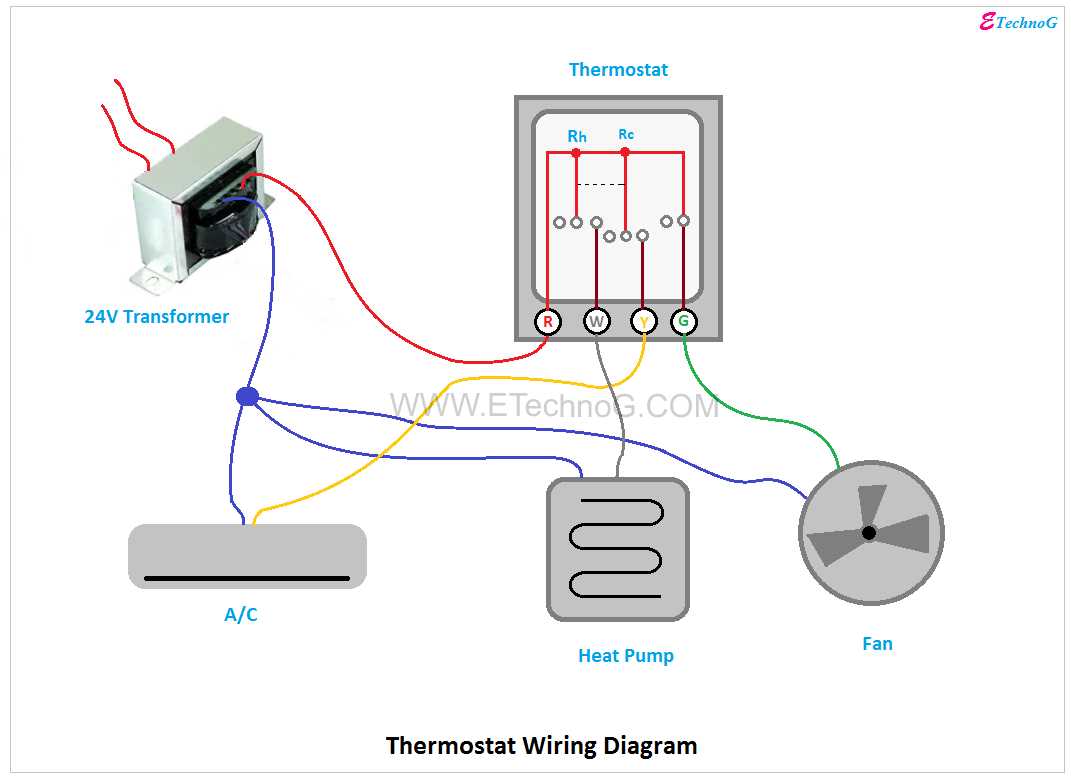
Connect the power lead to the designated terminal first to prevent short circuits or accidental damage. Ensure the auxiliary and control pathways are attached according to their specific labels, typically marked with letters or colors on the interface plate. Avoid forcing terminals; a snug fit reduces the risk of poor conductivity.
Use a multimeter to verify continuity before sealing any panels. Testing each conductor individually guarantees that signals will travel correctly between the temperature sensor and the central module, minimizing operational errors and unnecessary cycling of heating or cooling elements.
Maintain consistent labeling throughout installation. Tagging each strand not only simplifies future troubleshooting but also prevents misconnection during seasonal maintenance or system upgrades. Standardized markers like red for live, blue for neutral, and yellow for auxiliary can save hours in diagnostics.
Route cables away from high-voltage lines to reduce electromagnetic interference. Keeping sensor pathways separate from main electrical feeds ensures stable readings and accurate response from the control unit. Use protective conduit or cable sleeves where needed to prevent abrasion or accidental disconnection.
Secure all terminal screws firmly but without over-tightening. Excess torque can damage threads or strip connections, leading to intermittent failures. Regular inspections after initial operation confirm that no loosening has occurred and that thermal performance remains consistent.
Four Circuit Climate Controller Layout
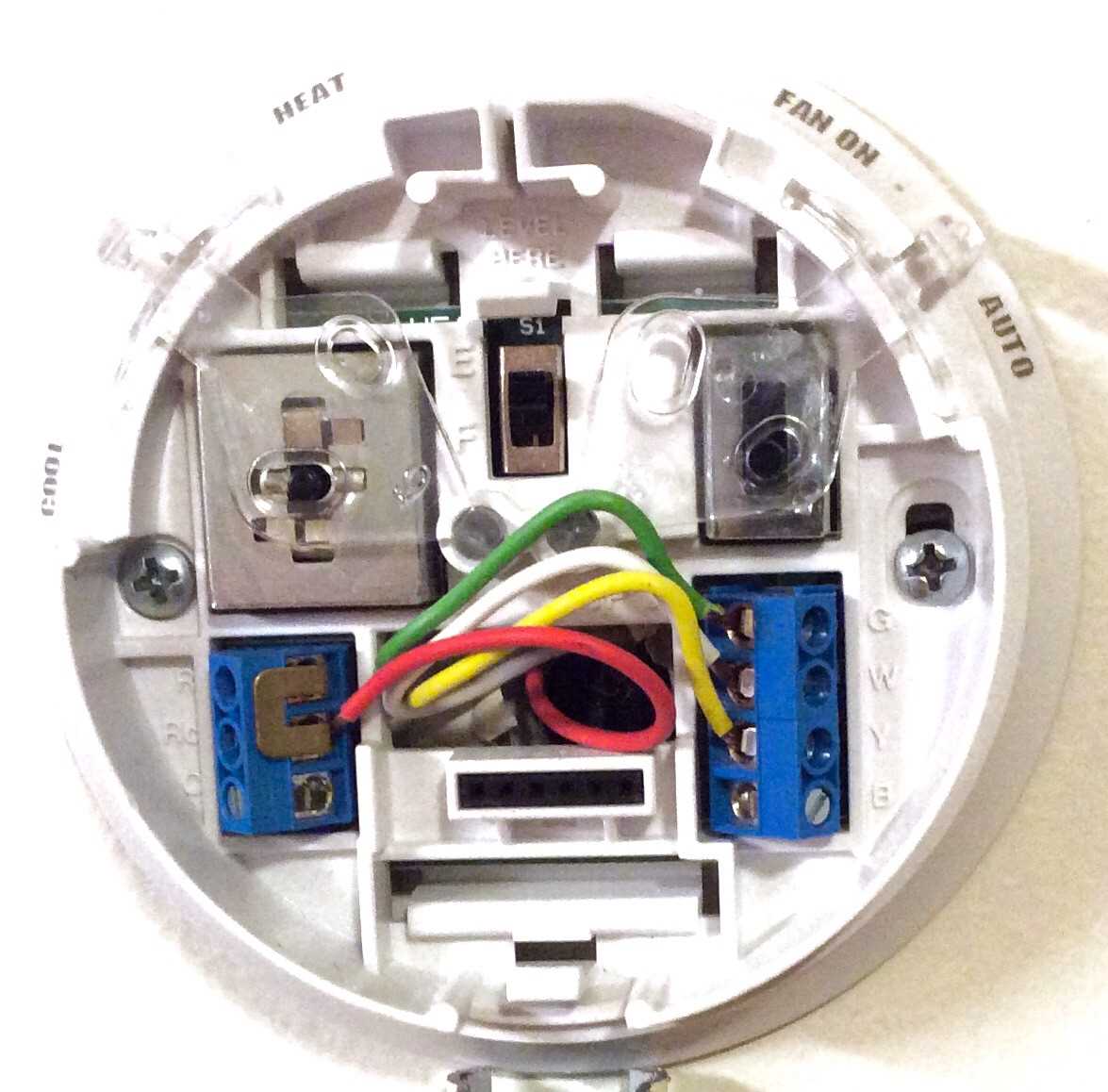
Connect the power lead to the terminal marked ‘R’ and ensure the neutral is secured at ‘C’ for stable voltage flow. Avoid reversing these connections, as it can damage the internal relay.
For controlling both heating and cooling modules, assign the heating relay to ‘W’ and the cooling relay to ‘Y’. Each should trigger independently based on room temperature feedback.
Follow this sequence for installation:
- Turn off the main supply before handling any terminals.
- Identify the load wires from the HVAC unit.
- Attach each conductor to its matching slot according to the unit’s color code.
- Double-check continuity before restoring power.
Optimizing Sensor Integration
Ensure the temperature probe is positioned away from vents and direct sunlight. Use short, twisted conductors to minimize interference. If the sensor shows unstable readings, swap connections at the control board and test for drift over one hour.
Label all connections immediately after attachment. Include a small schematic near the panel to aid future maintenance. Test the system through a full cycle to confirm that heating and cooling elements respond correctly and that the display updates accurately.
Identifying and Connecting Each Lead in a Four-Lead Control Unit
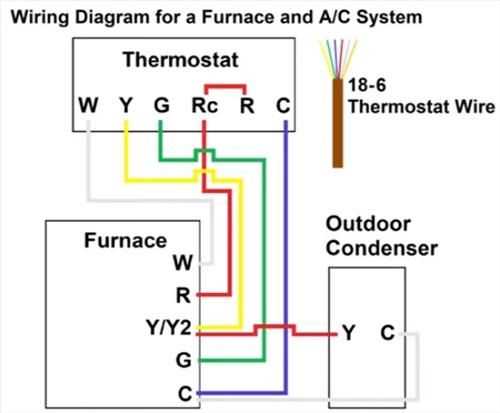
Begin by labeling each conductor based on its function: red supplies constant power, white controls heating, yellow regulates cooling, and green manages the fan. Use a marker or colored tape to prevent confusion during installation.
Check the voltage at the red conductor before making any connections. It should read 24 volts AC with respect to the common line. This confirms a live source and ensures safe handling of the other terminals.
Attach the white control line to the terminal responsible for activating the heating system. Tighten the screw firmly but avoid over-torquing, which can strip threads or damage the metal contact.
The yellow lead goes to the terminal that triggers cooling operations. Make sure insulation extends close to the terminal to prevent accidental shorts, especially if multiple lines run in a tight junction box.
Green, the fan conductor, should connect to the blower terminal. Verify that the fan responds correctly by switching the system to “on” mode before reassembling the faceplate.
Inspect all connections for secure seating. A loose terminal can cause intermittent operation, which often mimics component failure and leads to unnecessary troubleshooting.
After connecting all leads, power up the control unit and cycle through heating, cooling, and fan modes. Confirm that each function responds independently, and measure voltages again if any anomalies appear to pinpoint miswiring.