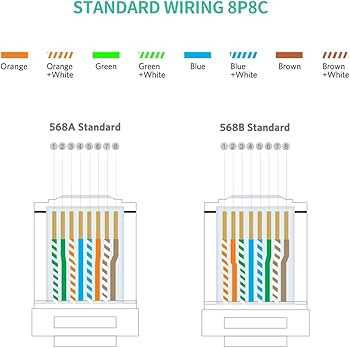
Use a standard sequence when terminating twisted pair cables to ensure consistent signal transmission. Follow the color-coded pairs exactly to avoid cross-talk or intermittent connectivity.
Trim each conductor to an even length before insertion into the modular plug. Maintain the twist of each pair as close as possible to the termination point to preserve signal integrity.
Secure the plug with a proper crimping tool that evenly compresses all contacts. Test each link with a continuity tester to confirm that all eight paths are correctly aligned and transmitting data.
Label each end of the cable clearly, especially in structured networks with multiple runs. Proper labeling reduces troubleshooting time and prevents accidental mismatches between ports.
Pinout and Termination Guide for Eight-Conductor Network Cables
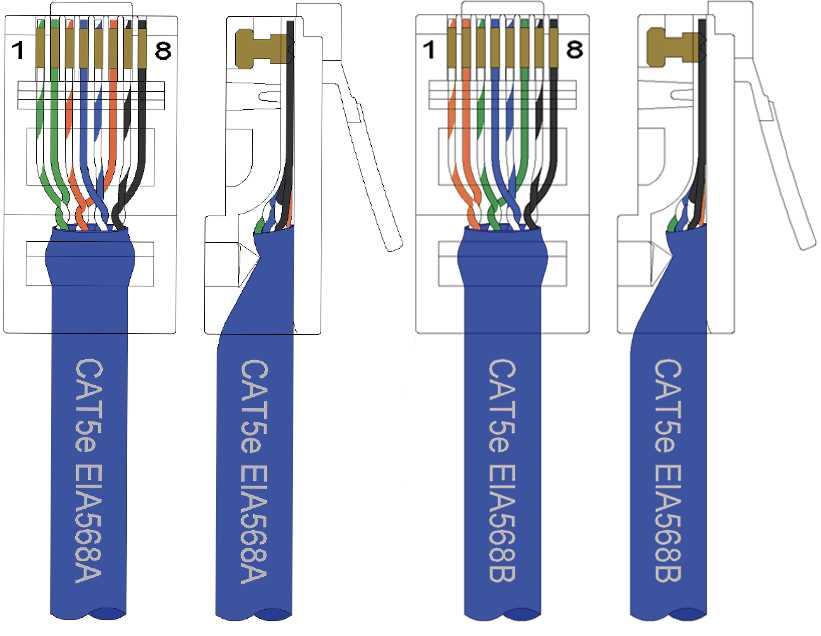
Align each colored pair according to the T568B standard to ensure compatibility with most network devices. Insert wires fully into the modular plug so that each conductor makes firm contact with the metal pins.
Trim the conductors evenly to prevent short circuits or misalignment. Maintain twists as close as possible to the termination point to reduce signal interference and maintain high-speed data integrity.
After crimping, verify connectivity with a network tester. Check each of the eight paths individually to confirm proper continuity, ensuring the installation supports reliable Ethernet transmission over standard distances.
Identifying Cable Pairs and Color Codes
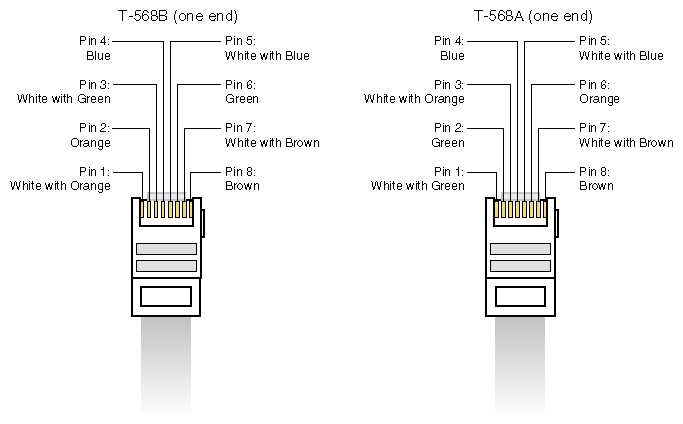
Separate each twisted pair carefully to prevent untwisting beyond 1.5 cm from the end. Maintain the pair order to preserve signal balance and reduce crosstalk between conductors.
Recognize the standard color combinations: blue, orange, green, and brown, each with a corresponding white-striped conductor. Match colors consistently at both terminations to avoid connectivity issues.
Use a color-coded chart or reference card when handling multiple runs simultaneously. Label each pair clearly to speed up installation and troubleshooting in complex networks.
Check for damaged or reversed pairs before insertion into modular plugs.
- Inspect insulation for nicks
- Ensure the copper core is intact
- Confirm correct pairing sequence
Maintain twists as close to the plug as possible. This prevents electromagnetic interference and preserves high-speed data performance over longer cable runs.
Test each connection with a network continuity tester. Verify that each conductor matches its designated pin to ensure the installation meets required Ethernet standards for reliable data transmission.