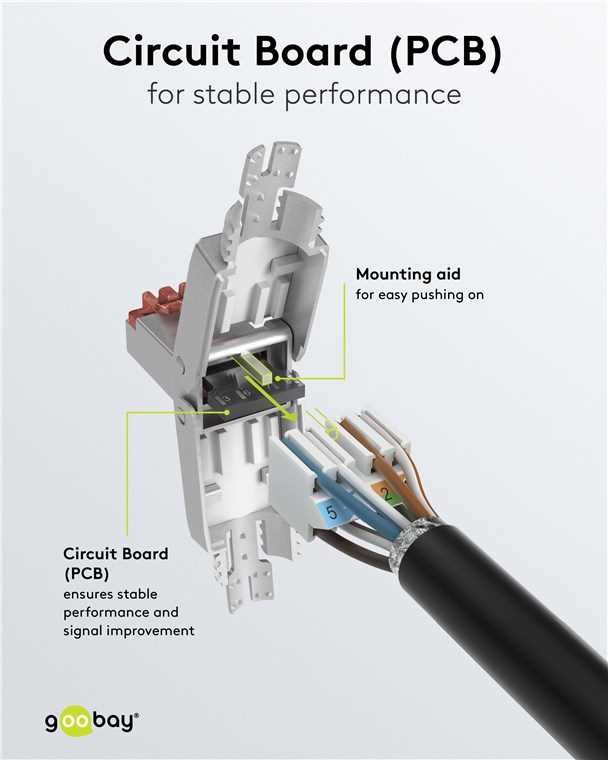
To create a proper network cable, start by correctly arranging the individual wires inside the plug. The most common wiring schemes are T568A and T568B. Ensure you follow one standard consistently across all connections for smooth data transmission. Double-check the color coding before inserting the wires into the connector, as mismatched connections can lead to connection failure or slower speeds.
Use a high-quality crimping tool to secure the wires in place and prevent any loose connections. Each wire should be cut to the correct length before insertion into the connector to avoid excess slack that could cause issues later. Once you’ve inserted the wires in the correct order, use the crimping tool to lock them into position, ensuring a solid and durable connection that will withstand use over time.
After completing the setup, always test the cable to ensure all connections are functional. This can be done using a network cable tester. If any issues arise during the test, check the wire order and verify that all connections are tight and properly seated in the plug. A well-made cable will provide stable and fast network connectivity without interruptions.
Wiring Diagram RJ45 Connector
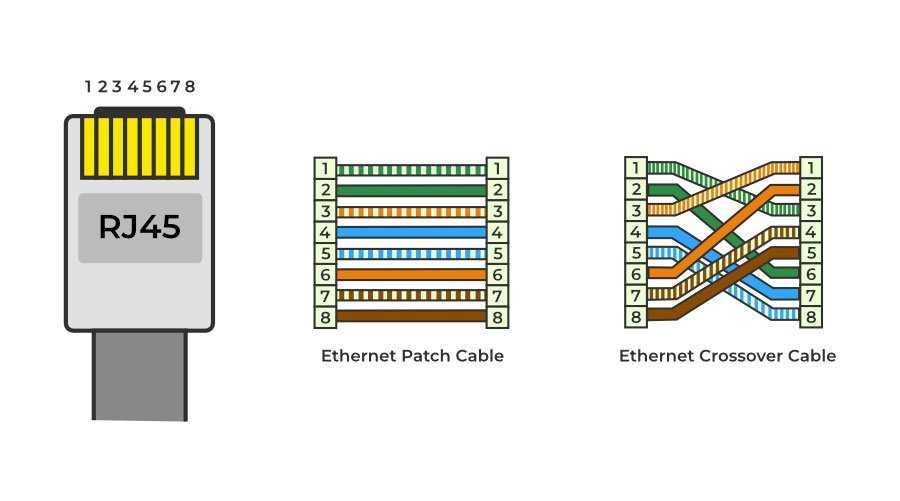
For proper connection, start by identifying the correct order of wires. The two most commonly used standards are T568A and T568B. Both standards have slightly different color codes, so make sure to follow one throughout the entire cable. T568A typically places green and white-green as the first pair, while T568B starts with orange and white-orange.
After determining the correct standard, strip the outer insulation from the cable carefully, exposing the individual wires. Each wire should be cut to the same length, ensuring that no wire is too long or too short to make contact within the plug. The length of the stripped section should only be enough to reach the end of the connector without excessive slack.
Next, insert each wire into the plug, following the color-coding order for the chosen standard. The wires should slide smoothly into the appropriate slots. Avoid any twisting or bending of the wires as this can damage the copper inside and lead to connectivity issues. Ensure that each wire is fully seated at the end of the connector before proceeding.
Once all the wires are in place, use a crimping tool to press the metal pins inside the plug onto the wires. This step is critical, as it ensures a secure connection and prevents the wires from becoming loose. Apply even pressure to ensure all the pins make a solid contact with the wires, allowing for stable data transmission.
After crimping, check the connection for any loose or exposed wires. If any wire is not fully inserted or crimped properly, it may result in malfunctioning signals or total failure. Re-crimp the connector if needed, or replace the connector if it was damaged during the process. Proper testing of each connection is key to avoiding future issues.
Finally, test the completed cable with a network cable tester. This tool helps verify that each wire is correctly connected and that the signals flow as expected. If any issues are detected, double-check the order of the wires and the crimping process. Ensuring that all connections are correct and well-secured will guarantee that the cable functions correctly in networking setups.
Step-by-Step Guide to Crimping an RJ45 Connector
Start by preparing the cable. Cut the cable to the required length, ensuring there is enough slack to work with. Using a wire stripper, remove the outer jacket of the cable to expose the individual wires. Strip about 1 inch (2.5 cm) of the outer insulation, being careful not to nick or damage the wires inside.
Next, untwist the pairs of wires and straighten them out. Align the wires according to the wiring standard you’re using–either T568A or T568B. Make sure the colors are ordered correctly, with each wire positioned in its corresponding slot. Double-check the order to ensure accuracy before moving on to the next step.
Once the wires are aligned, trim them to the correct length. The wires should be cut evenly so that they all fit snugly into the connector without excess length. Leave just enough exposed wire to reach the end of the connector, ensuring a solid and secure contact when crimped.
Insert the wires into the connector with the clip facing away from you. Gently slide each wire into the appropriate slot until the wires reach the end of the connector. Ensure that each wire is properly seated and aligned with its respective channel. There should be no gaps or loose wires, as this can affect the connection.
Now, use a crimping tool to press the connector onto the wires. Place the connector into the crimping tool, ensuring that the metal pins inside the connector make contact with each wire. Squeeze the crimping tool firmly, applying even pressure to ensure a tight, secure fit. This will lock the wires in place and ensure a stable connection.
Finally, inspect the crimped connector. Make sure that all the wires are securely fastened and that none of them are sticking out of the connector. If any wires are exposed or improperly crimped, re-crimp the connector. Once you’re satisfied with the result, test the cable with a cable tester to verify that all the connections are working properly.