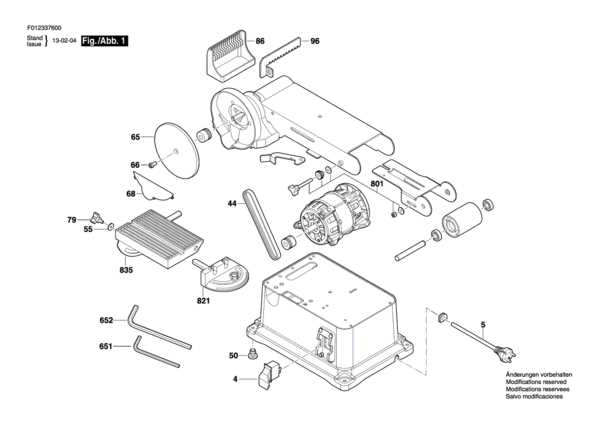
Start by identifying the core elements that power the machine. The motor is central to all operations, providing the necessary force to move the sanding mechanism. Ensure the motor is free from dust buildup and the connections are secure to prevent overheating or inefficient operation.
Next, check the sanding mechanism itself. The mechanism includes rollers and a surface that holds the abrasive material in place. Over time, these parts can wear out, especially if used on rough materials. Inspect the rollers for wear and ensure they rotate freely, as any blockage can slow the machine down.
Ensure the tensioning system is functioning properly. The system keeps the sanding material tight, preventing it from slipping or sagging during use. If you notice any unevenness in sanding results, it could be due to improper tension, so adjust or replace the tension components if necessary.
Lastly, check for wear on the dust collection system. As you work with sanding equipment, dust accumulation can affect performance and safety. Make sure all hoses are intact and free from blockages. Replace or clean filters regularly to maintain proper airflow and prevent dust from spreading during operation.
Identifying Key Components of the Sanding Machine
The motor is the driving force behind the equipment. It powers the moving parts and ensures consistent performance. Inspect the motor for any dust buildup, which could lead to overheating or reduced efficiency. Ensure that the motor connections are tight and secure.
The sanding mechanism, which includes the rollers and the surface holding the abrasive material, plays a key role in material removal. Check the rollers for wear, making sure they rotate freely without obstruction. Replace any worn or damaged rollers to maintain smooth operation.
The tensioning system holds the abrasive material taut, preventing slippage and ensuring even sanding. If you notice uneven wear patterns or a drop in performance, inspect the tensioning components for damage or misalignment. Adjust or replace the tensioner as needed to restore optimal function.
The dust collection system helps keep the work area clean and prevents debris buildup. Ensure that the collection hoses are clear of blockages and that any filters are properly cleaned or replaced. A clogged dust system can reduce airflow, affecting the machine’s performance.
How to Use the Component Map for Maintenance and Repairs
First, locate the section that corresponds to the main assembly of the equipment. This area typically includes the motor and the driving components. Identify any parts that are prone to wear and tear, such as belts or gears. This will help you quickly spot the source of any performance issues.
Examine the exploded views to see how each part fits together. Pay special attention to the placement of screws, bolts, and washers. This detailed view will help you disassemble the equipment safely without missing any components during reassembly.
Use the reference numbers or letters next to each part to cross-check with your parts list. This will ensure you have the correct components when ordering replacements. Double-check each part’s condition before deciding whether to replace or repair it.
If you notice any damaged parts, consult the diagram to understand their connection to the overall system. This will allow you to pinpoint the root cause of the problem and decide whether further inspection or repairs are needed for other related components.
After replacing any worn-out parts, use the diagram to reassemble the equipment properly. Make sure each component is placed in its correct position and tightened to the manufacturer’s recommended specifications to maintain optimal performance.