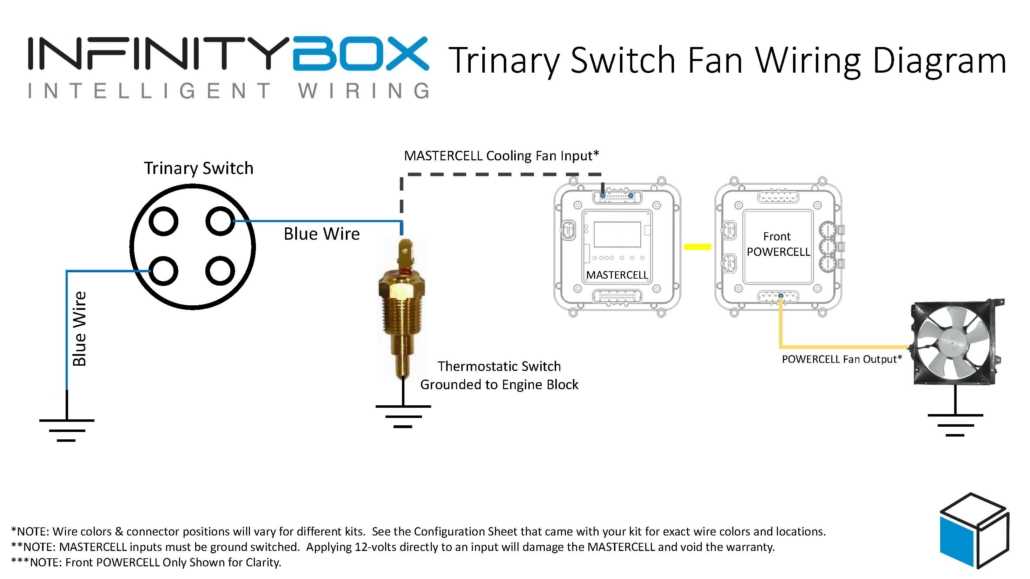
Confirm voltage ratings on the relay and sensor terminals before connecting power. Applying incorrect voltage can damage the compressor relay, fan controller, or safety cutoff components. Measure with a multimeter to verify supply and ground lines.
Label each connection to distinguish high and low-pressure inputs and outputs. Clearly marking terminals prevents cross-connection between the compressor, condenser fan, and thermal cutoff circuits during installation.
Follow the signal flow from the pressure sensor to the control relay. Understanding which paths carry trigger signals versus steady power allows for accurate troubleshooting if the fan or compressor fails to engage.
Inspect all terminals and connectors for corrosion or loose contacts. Re-tighten screws and clean oxidized contacts to maintain stable operation. Replace damaged terminals to avoid intermittent faults or shorts.
Test each stage individually by applying known input conditions and monitoring outputs. Check that the compressor relay clicks at the correct pressure range and the fan activates in response to thermal triggers. Document results for future reference and maintenance.
Control Module Connection for Pressure and Thermal Circuits
Identify terminals accurately before attaching leads. Mark the high and low-pressure inputs, compressor trigger, and fan output to prevent cross-connections that can cause relay failure or system lockout.
Check voltage and continuity along each path. Use a multimeter to confirm correct polarity and uninterrupted connections between the sensor, relay, and fan controller. Interruptions or reversed polarity can prevent proper engagement of cooling or protection circuits.
Routing Leads to Prevent Interference
Keep power and signal lines separated from high-current paths. Twisting low-voltage pairs and securing connectors reduces electromagnetic interference that can trigger false activation of the compressor or fan relay. Use insulated terminals to avoid shorts.
Testing and Troubleshooting Connections
Apply step-by-step testing by simulating high and low-pressure conditions. Confirm the compressor relay clicks and the fan engages at correct thresholds. Document each reading and adjust connections if the module fails to respond consistently under test conditions.
Identifying Terminals and Connection Points
Label each terminal before making connections to avoid mistakes during installation. Mark input, output, and ground points clearly to prevent cross-connections that can damage relays or sensors.
Use a multimeter to verify continuity and voltage levels at each point. Confirm that all pins receive the correct supply voltage and that signal paths are not interrupted by corrosion or loose contacts.
Inspect connectors for physical damage. Bent pins or cracked housings can cause intermittent failures, reducing reliability of the module and affecting fan or compressor engagement.
- Identify high-pressure input terminals
- Mark low-pressure sensor points
- Locate relay activation pins
- Check fan output terminals
Trace each lead visually and with a tester. Ensure that trigger paths from the sensor to the relay are free from shorts or unintended connections that could prevent proper operation.
Verify insulation on all connections to prevent arcing or accidental grounding. Heat shrink tubing or properly rated connectors reduce risk of shorts and extend the service life of the module.
Compare each connection to technical references or manufacturer notes. Slight variations in module versions can change pin assignments, so double-check placement before applying power.
- Document each terminal’s function and label it
- Confirm polarity on power and ground connections
- Test each signal path individually
- Secure connectors and verify stability under vibration