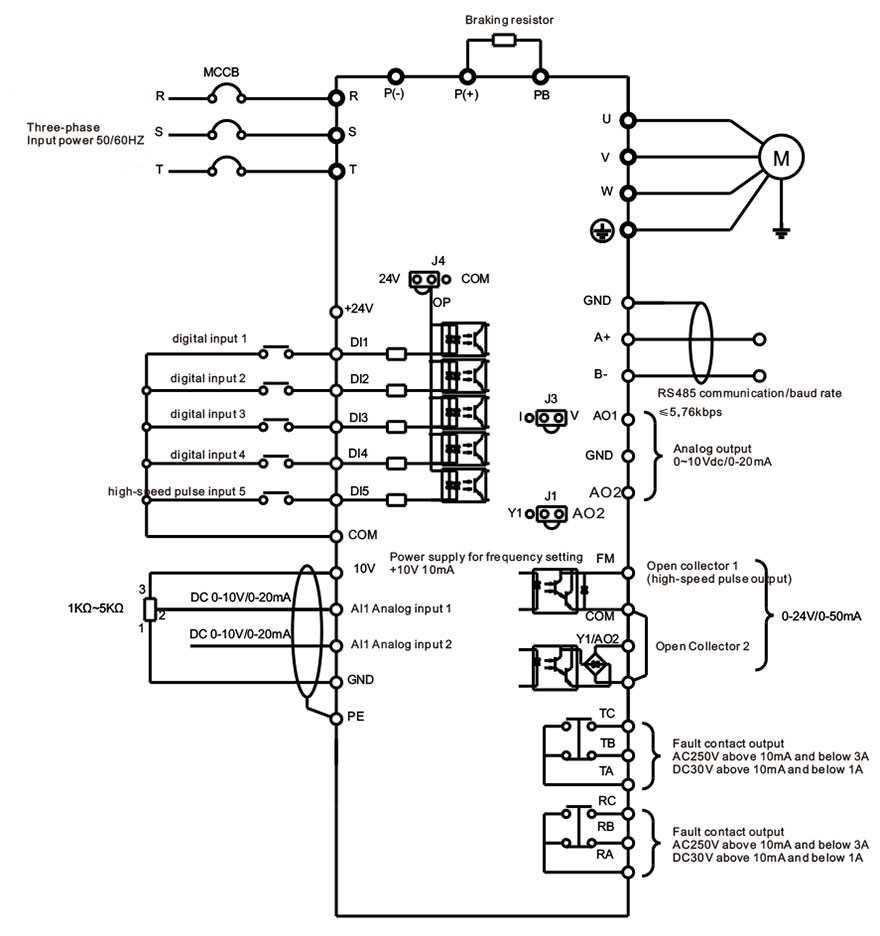
Ensure the main supply is turned off before making any connections to the controller. Verify voltage rating matches the motor requirements and that all protective devices such as fuses or breakers are correctly sized.
Use properly rated conductors for input and output terminals, typically 10 to 14 AWG for motors up to 5 HP. Keep wires organized and separated from high-current lines to reduce interference and overheating.
Label each line clearly and document terminal assignments. Check for correct polarity at input and output points to prevent motor rotation issues or damage to the control module.
Test each connection with a multimeter for continuity and insulation resistance before powering the network. Confirm grounding is secure and that protective devices respond correctly to simulated faults.
Three Line Motor Controller Connections and Layouts
Confirm that the main power supply is switched off before connecting the controller to the motor. Use insulated tools and verify that the rated voltage and current of the controller matches the motor specifications to prevent overload or damage.
Attach input lines to the designated terminals, following color codes and manufacturer instructions. Ensure grounding is secure to avoid potential shock hazards and reduce electrical noise in the system.
Output wiring to motors
Connect the output terminals to the motor leads, maintaining consistent wire lengths and proper insulation. Keep conductors separate from signal or control lines to minimize interference and voltage drops. Check that connections are tight and free of corrosion.
For motors with built-in feedback sensors, connect encoder or tachometer lines according to the controller specifications. Verify signal integrity by measuring resistance and continuity before powering the module.
Control and protection setup
Integrate protective devices such as fuses, breakers, and overload relays on each branch. Document the connections and label each line clearly to simplify future maintenance and troubleshooting.
Test the installation by gradually energizing the controller and observing motor operation. Check for correct rotation direction, smooth acceleration, and response of safety devices to simulated fault conditions to ensure reliable performance.
How to connect input power and ground to the motor controller
Switch off the main supply before making any connections to prevent electrical hazards. Verify the voltage and current ratings of the controller match the motor and supply specifications to avoid damage.
Use insulated tools and maintain proper personal protection when handling live components. Confirm that all terminals are clean, free from corrosion, and securely mounted.
Input power connection steps
- Identify input terminals based on manufacturer markings and wiring instructions.
- Strip insulation carefully and ensure the conductor length matches terminal depth.
- Connect each supply line to its designated terminal and tighten screws to the recommended torque.
- Check that no strands are left exposed to prevent short circuits.
- Use ferrules for stranded wires to improve contact and reduce risk of loosening over time.
Secure the grounding conductor to the dedicated ground terminal or bus bar. Ensure the connection is tight and verify continuity to the system’s earth point. This reduces electrical noise and improves safety during operation.
Route input wires separately from signal or control lines to avoid interference. Maintain proper clearance from metallic surfaces and other energized conductors.
Final verification before energizing
- Use a multimeter to measure resistance and verify continuity of each input line.
- Check that the ground path shows minimal resistance to the main earth.
- Ensure protective devices such as breakers and fuses are correctly installed and rated.
- Document terminal assignments and conductor colors for future maintenance.
After confirming all connections, power the controller gradually and monitor for abnormal heating or voltage drops. Verify that protective devices operate correctly under simulated load conditions.