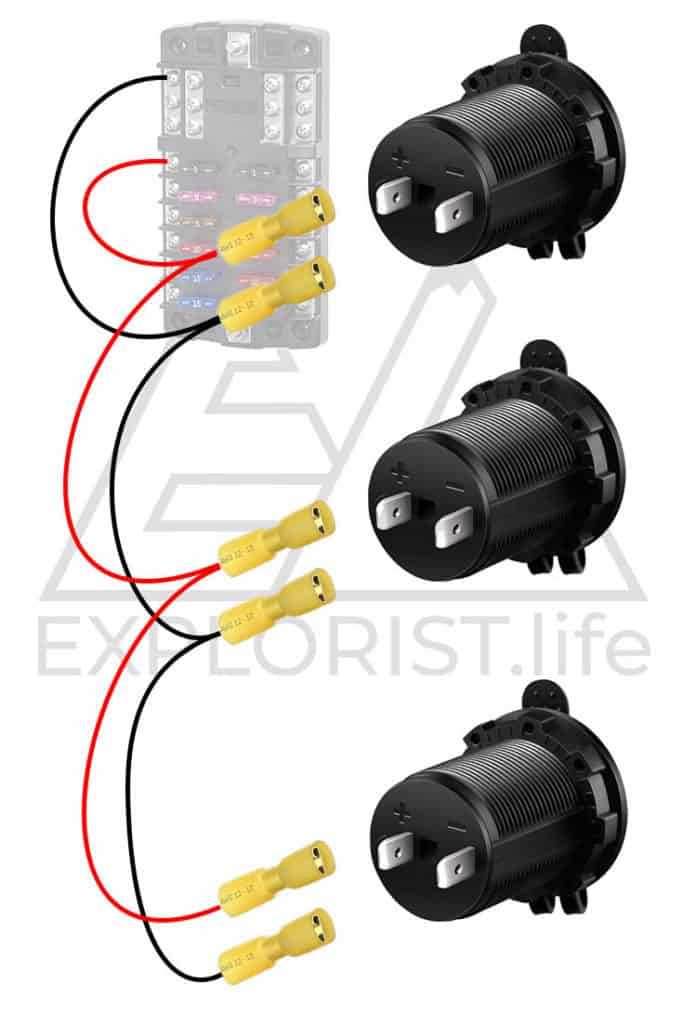
To properly set up a 12-volt system, first ensure all components are compatible with this voltage level. It’s crucial to choose the correct gauge of cables to prevent overheating and ensure safe energy flow throughout the system. Using an inadequate wire size could lead to excessive power loss or even pose a fire risk.
Next, identify the key connections: power source, load, and ground. The power source, usually a battery or similar unit, should have a clear positive and negative terminal. Ensure that the load–whether it’s lights, motors, or appliances–is rated for 12 volts. Lastly, a reliable ground connection is needed to complete the circuit safely, preventing potential damage to sensitive components.
For those installing such a setup in a vehicle or home appliance, check the polarity before making final connections. Incorrect polarity can damage the connected devices. Using color-coded wires and ensuring proper insulation will minimize the chance of mistakes and enhance the longevity of your system.
Understanding 12 Volt System Components and Connections
The first step in constructing a reliable 12V system is selecting the right power source. Most commonly, this is a 12-volt battery. Make sure the battery’s capacity aligns with the energy needs of the devices you plan to power. For example, larger devices like motors or high-power lights may require batteries with higher amp-hour ratings. Always check the battery’s specifications to ensure it can handle the load over time without draining too quickly or overheating.
When choosing cables, always prioritize proper gauge to handle the required current. For short distances, a smaller gauge wire may be sufficient, but for longer runs or higher currents, use thicker cables to avoid excessive voltage drop. Secure each wire with appropriate connectors and ensure that all connections are tight to prevent any power loss or sparking. Grounding is just as important; without a proper ground connection, the system may become unstable or even cause electrical damage.
- Power Source: Typically, a 12V battery or similar supply.
- Cables: Choose wires of the correct gauge to match the power draw.
- Grounding: Ensure a solid ground to complete the circuit and prevent damage.
After setting up the power supply and wiring, the next task is ensuring proper connections to the load devices. Double-check polarity to prevent damaging sensitive components. For example, reversing connections can cause lights or motors to fail. If your system includes fuses, install them near the power source to protect your equipment from short circuits. A properly wired system ensures longevity and consistent performance of the connected devices.
Step-by-Step Guide to Wiring a 12 Volt Electrical System
Begin by gathering all the necessary components: a 12V power source, cables, connectors, and any devices you’ll be powering. Select wires based on the current demands of your equipment, ensuring you choose an appropriate gauge. For example, a 12-gauge wire is typically suitable for devices drawing up to 20 amps. Cut the wires to the required length, allowing some extra slack for easier connection. Ensure all components are turned off before beginning the setup to avoid accidental short circuits.
Connecting the Power Source
Start by connecting the positive terminal of your 12V battery to the power input of your first device. Use a terminal connector to ensure a secure and stable connection. Follow by linking the ground terminal of the power source to a suitable grounding point. This step is necessary to complete the circuit and allow proper functioning. Use a fuse or circuit breaker near the power source to protect the system from potential overloads or shorts.
Linking Devices and Testing
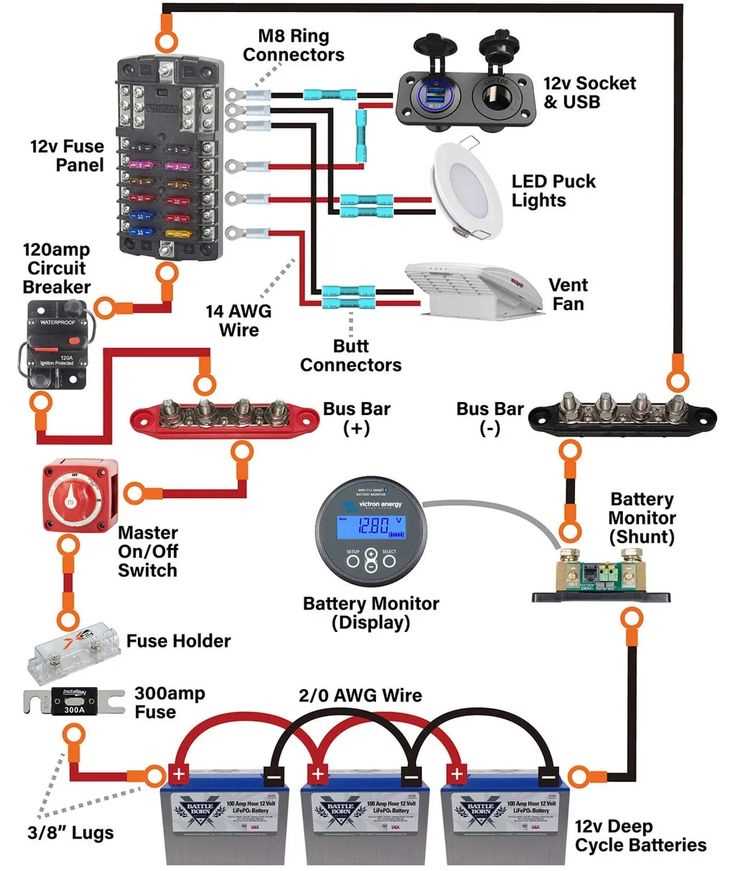
After securing the power and ground connections, proceed with connecting the devices in a parallel configuration. This ensures that each device receives the correct power and operates independently. Once everything is connected, switch on the system and test each device to confirm it is working properly. Monitor the connections for any signs of overheating or poor contact. Adjust if necessary, ensuring all components are firmly secured and no wires are exposed.
Troubleshooting Common Issues in 12 Volt Electrical Systems
Start by checking the power source. If your system isn’t turning on, the battery may be discharged or improperly connected. Use a multimeter to check the battery’s charge level and inspect the terminals for corrosion or loose connections. Cleaning the terminals and ensuring a firm connection can resolve many power issues. If the battery is drained, recharge it or replace it with a fully charged unit.
Loose or Faulty Connections
Loose connections can prevent proper power flow, causing devices to malfunction or not work at all. Check all terminals, connectors, and cable ends. Tighten any loose screws or bolts and inspect for signs of wear or damage. Damaged connectors should be replaced, as they can cause intermittent contact, leading to unreliable performance.
Short Circuits and Blown Fuses
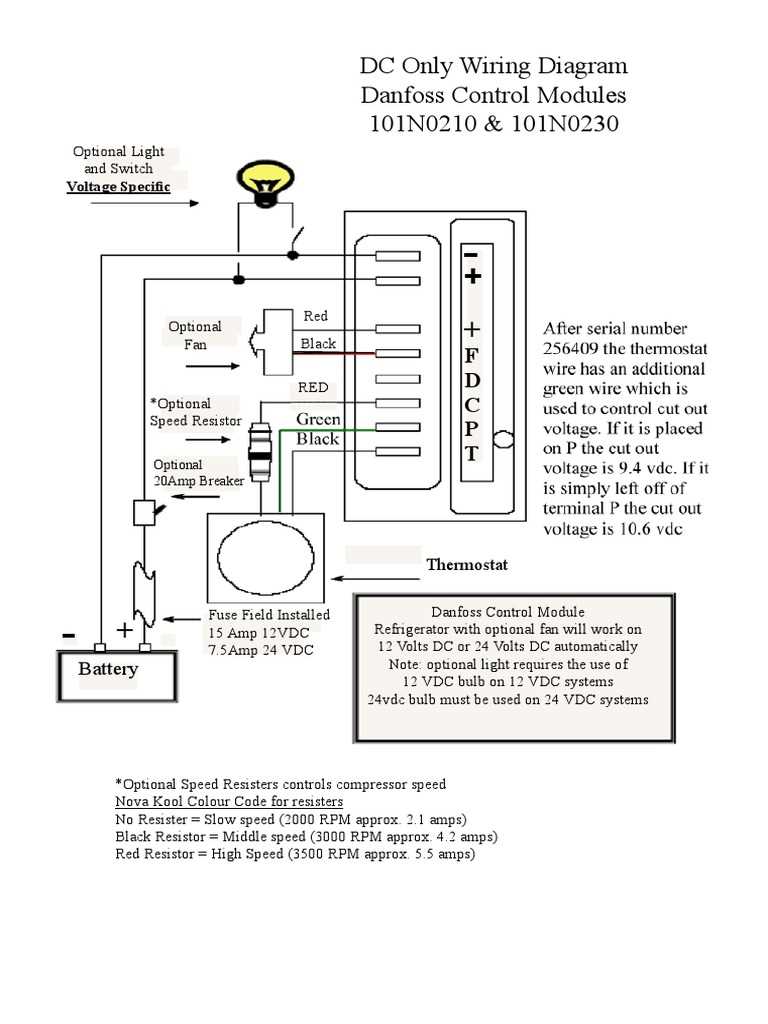
Short circuits are common in electrical setups, especially when exposed wires touch metal surfaces. If a fuse blows, it often indicates a short circuit. Inspect the entire setup for exposed or frayed wires, particularly around junctions and connectors. Replace any blown fuses with ones of the correct amperage. After replacing, test the system again to ensure everything is functioning properly.
Sometimes, poor grounding can lead to faulty operation. If the ground connection is loose or corroded, it can cause voltage irregularities. Always check the ground connection and clean any rust or dirt from the contact points. Ensure the ground wire is securely fastened to a clean, unpainted metal surface to guarantee proper operation.
If devices are flickering or not receiving steady power, voltage drop may be the issue. This occurs when cables are too thin or the distance between the power source and the load is too long. Check the gauge of the wire and, if necessary, upgrade to a thicker one to handle the load. You can also reduce the distance between components to minimize power loss.
Another common issue is inconsistent performance, which can be caused by faulty or incompatible components. Double-check that all devices are rated for the same voltage as your power source. If a device is underpowered or incompatible, it may draw excessive current, leading to malfunctions or damage. Replacing the faulty component or using a step-up/down converter may be necessary to fix this issue.
Devices that suddenly stop working may also be suffering from overheating. If components are too close to each other, the heat generated could cause failures. Ensure there is adequate ventilation for all components, especially high-power devices. Consider adding cooling fans or heat sinks to prevent overheating and extend the lifespan of your equipment.
Lastly, always verify the polarity before making connections. Reversing the positive and negative connections can damage sensitive components. Use color-coded wires and connectors to simplify this process and reduce the risk of mistakes. If you’re unsure about the connections, consult the product’s manual or specifications for guidance on proper setup.